

Table of Contents
You can trigger webhooks on any mutations performed on your database via Space Cloud.
Note: For update and delete mutations, the webhook will be triggered only if the
whereclause of mutation consists of the fields uniquely identifying the row (i.e. the primary fields or fields having unique constraints).
Open a project in Mission Control, head to the Event Triggers section and click on the Add button to open the form below:
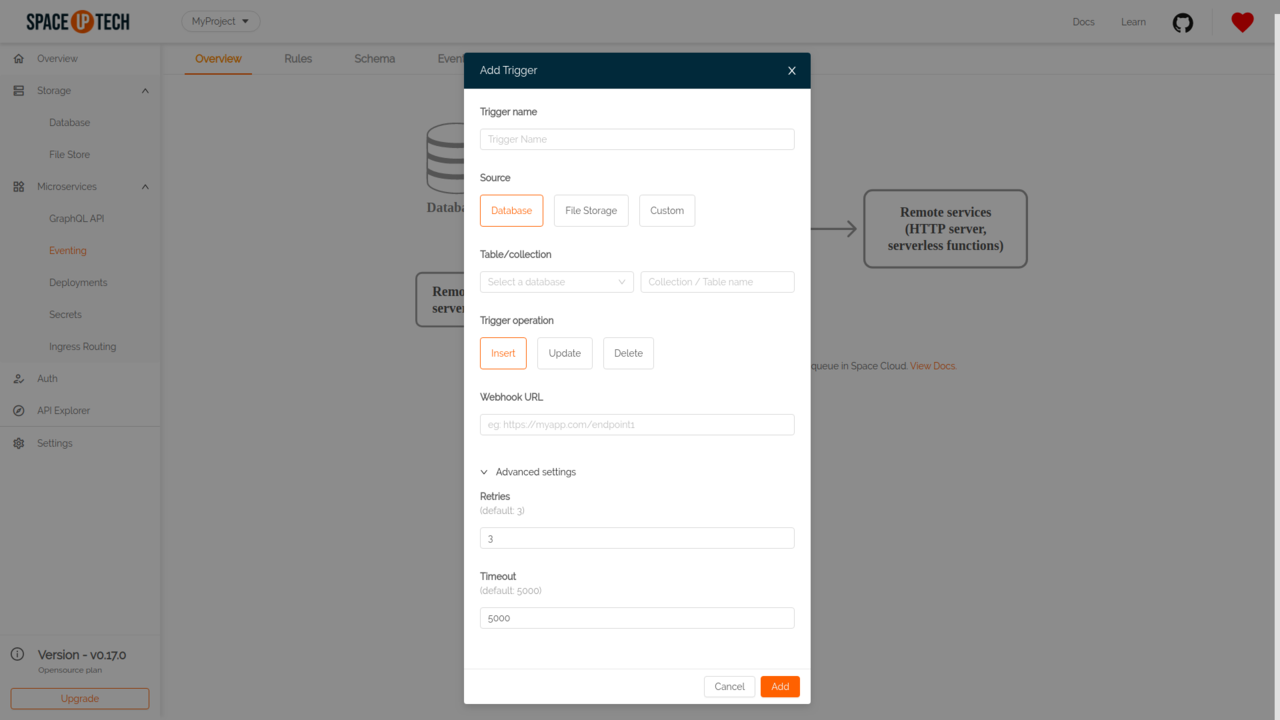
Trigger Name
Give a unique name for an event trigger. (e.g., welcome-email )
Source
Select Database as the event source.
Database
Select the database for which you want to create an event trigger.
Collection/Table Name
Put the table/collection name for which you want to create an event trigger. It is an optional field. If you leave this field empty, the event trigger gets configured for all tables/collections in the selected database.
Trigger operation
Select the CRUD operation for which you want to create the event trigger. Can be one of:
Webhook URL
The HTTP(s) URL that should get triggered with the event payload on the configured operation. Must be a POST handler.
Retries
The number of times to retry a failed invocation. Default value is 3.
Timeout
Timeout in milliseconds. Default value is 5000.
The webhook is delivered over HTTP POST request to the specified webhook URL with the following headers:
Content-Type: application/jsonThe POST body of the webhook is a JSON object which follows the Cloud Events specs:
{
  "specversion": "1.0-rc1",
  "id": "<unique-uuid>",
  "type": "<event-type>",
  "source": "<space-cloud-node-id>",
  "time": "<date-string>",
  "data": {
    "db": "<db-type>",
    "col": "<col-name>",
    "docId": "<document-id>" ,
    "doc": "Object"
  }
}| Key | Type | Description |
|---|---|---|
| specversion | String | Version of the Cloud Events specifications. |
| id | String | A unique identifier of an event. |
| type | String | Event type. One of DB_INSERT , DB_UPDATE or DB_DELETE . |
| source | String | Unique identifier of a Space Cloud instance. |
| time | String | Time at which the event occurred(ISO 8601 format). |
| data.db | String | Database type. One of mongodb , sql-postgres or sql-mysql . |
| data.col | String | Collection/table on which the event occurred. |
| data.docId | String | Unique identifier of a row/document ( id field in SQL databases and _id field in MongoDB). |
| data.doc | Object | The document being inserted or updated. Latest document in case of update operation. |
For example:
{
  "specversion" : "1.0-rc1",
  "id": "43e32d79-f2bf-41c0-be5f-a75c8c1bcfbf",
  "type": "DB_INSERT",
  "source": "1fb07d5d-b670-468e-ba94-ad5f06a5c053",
  "time": "2019-10-19T12:40:50.053Z",
  "data": {
    "db": "mongodb",
    "col": "authors",
    "docId": "ff4a2ee9-830d-487f-8871-8c8b5a61b0bd" ,
    "doc": {
      "_id": "ff4a2ee9-830d-487f-8871-8c8b5a61b0bd",
      "title": "Getting started with event triggers",
      "is_published": false,
      "created_at": "2019-10-19T12:40:50.053Z"
    }
  }
}A 2xx response status code from the webhook target is deemed to be a successful invocation of the webhook. Any other response status results in an unsuccessful invocation that causes retries as per the retry configuration.
Have a technical question?


Improve the docs!